1. Getting around
Sign in, find your way around the admin, and read the dashboard.
Sign in
- Go to quilthosting.com/admin.
- While the site is in private preview, it asks for the access password first. Type it and press Enter.
- Press the Google button and use the Google account the guild added as an officer. That is the only way in — there is no separate password.
- The website you are working on is named at the bottom of the left sidebar. To switch websites, open Settings and press Switch website at the very bottom.
Signed in but see no guild? The email you used is not on the guild's team. Ask an owner to add it in Team.
The sidebar
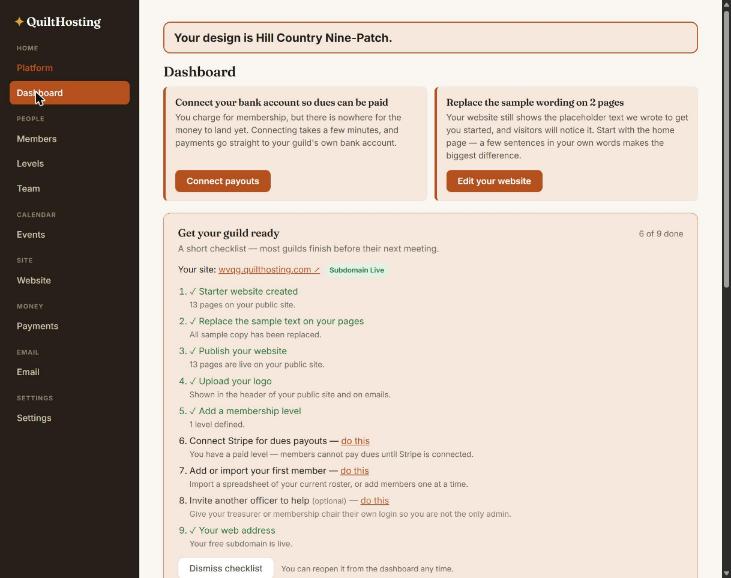
QuiltHosting starts with nine screens, grouped. That is on purpose — these are the ones guilds use every week.
| Screen | What it is for |
|---|---|
| Dashboard | What needs doing, and the numbers. |
| Members | Your roster. Add, import, export, edit. |
| Levels | The kinds of membership and their prices. |
| Team | Who else can sign in, and what they can change. |
| Events | Meetings, workshops, the calendar. |
| Website | Pages, design, logo, menu, publishing. |
| Payments | Dues and ticket money that came in. |
| Newsletters to members. | |
| Settings | Time zone, payouts, custom fields, Advanced. |
Showing the hidden screens
Photos, Documents, Forms, Invoices, Automations, Store and a few more are hidden until you ask for them.
- Open Settings.
- Find the Advanced card and tick Show advanced features.
- Press Save advanced settings at the bottom of the card. Without that, nothing changes.
- The extra screens appear in the sidebar under their headings. Nothing you set up changes. Untick it and save again any time to tidy up.
Only an owner or admin can change this switch.
Read the dashboard
The Get your guild ready checklist counts itself from what is really on the site. Nothing is ticked by hand. Each unfinished line has a do this link that jumps to the screen that finishes it.
Under it are six numbers: active members, new this month, renewals due in 30 days, upcoming events, event sign-ups this month, and pending / lapsed. A guild with no members imported yet shows zeros — that is normal, not broken.
If it goes wrong
| You see | Do this |
|---|---|
| “Your design is …” banner across the top | That is just telling you which design the site uses. It is not an error. |
| A screen from these guides is not in the sidebar | Settings → Advanced → Show advanced features. |
| The Members screen shows “isBusinessTenant is not defined” | That was a bug in version 0.93.1 and earlier. It is fixed in 0.93.2. Refresh the page; if it persists, tell Dan. |
| You can see a screen but the buttons are grey | Your role is read-only there. An owner can change it in Team. |