5. Members, levels and dues
Set up a level, bring your roster in, and take dues.
Make a level first
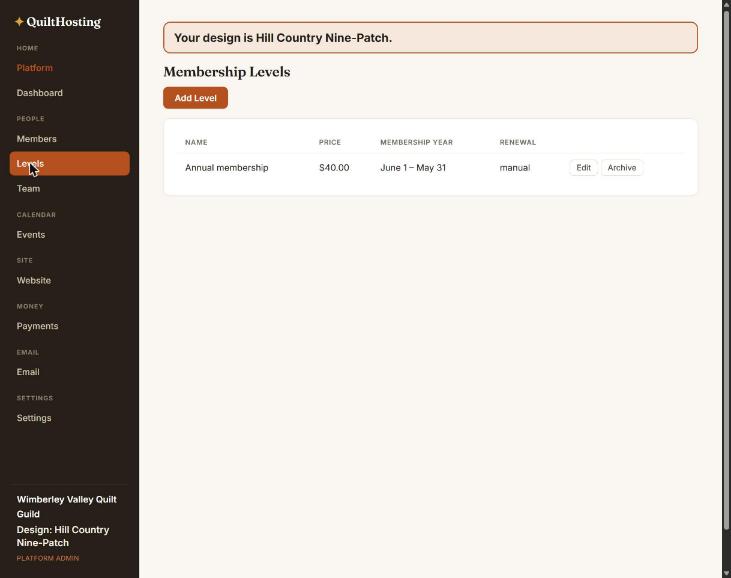
A level is a kind of membership with a price. Join buttons lead to one. Without a level, nobody can join.
- Levels → Add Level.
- Give it a Name (Individual, Family) and a Price in dollars. A price of 0 activates the member immediately with no card.
- Choose how dues run: from each member’s join date, over a membership year (the Levels list shows it, like “June 1 – May 31”), or on a fixed date. A grace period keeps someone active a little after their date.
- Choose Manual renewal (members pay again each term) or Auto (a Stripe subscription).
Levels cannot be deleted. Archive hides one from the join page while keeping its history. A household level lets one payment cover several people.
Connect Stripe so dues can be paid
- Settings → Billing & payouts → Connect bank account (Stripe). An owner or admin does this.
- Stripe asks for the guild’s details and bank account. QuiltHosting never sees them.
- When it says Ready — payouts enabled, dues and ticket money go straight to the guild’s bank.
Until Stripe is connected, a member who tries to pay dues cannot complete it. Connect it before you announce the site.
Bring your roster in
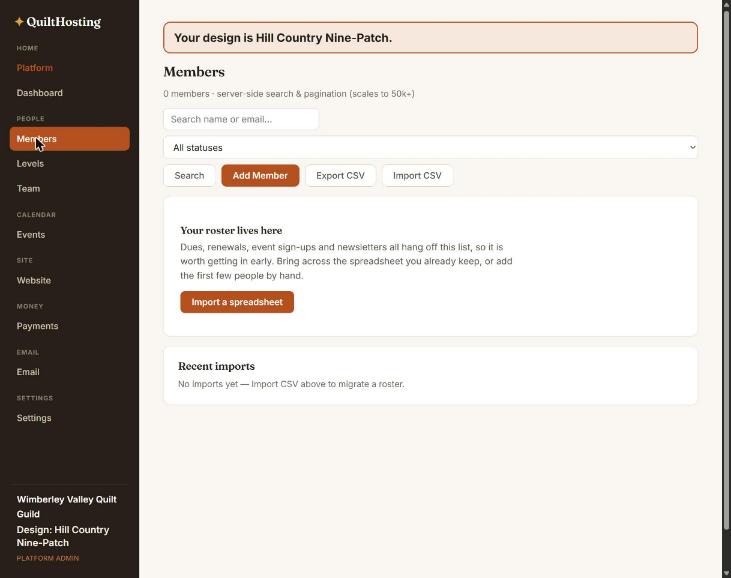
- Members → Import CSV. Up to 5,000 rows a file.
- Pick the file. Every column is read — nothing is silently dropped.
- Check the column table. Each column has a dropdown: a known field, Import as custom field, or Do not import. Wild Apricot headings are matched for you. Confirm the guesses.
- Read the preview: how many will be created, updated and skipped. Nothing is written yet.
- Press Import. Read the summary. Download problem rows lists anything that needs fixing.
Rows are matched by email address. Importing the same file twice updates people; it does not duplicate them. A blank cell never erases something you already have. There is no undo. To repair, fix the rows and import again.
Add one person
Members → Add Member. Type their name and email. New members start as Pending until they pay or you activate them.
Record dues paid by check or cash
- Open the member.
- Press Assign / renew membership.
- Pick the level. The end date fills in; change it if you need to.
- Optional: record the amount and how it was paid. It shows up in Payments as “Offline”.
No receipt email is sent for dues recorded by hand.
What the statuses mean
| Status | Meaning |
|---|---|
| Pending | Added but not paid or activated. |
| Active | Has a current membership. Only these count toward the free plan and get member pricing. |
| Lapsed | Their end date passed. Set overnight. |
| Cancelled | Removed. “Delete” does this; the history is kept. |
The free plan allows 30 active members. The 30-day trial and the Guild plan ($24 a month) have no limit. Settings → Billing & payouts shows your plan and when the trial ends.
If it goes wrong
| You see | Do this |
|---|---|
| Members shows an error instead of the list | Refresh. If it says isBusinessTenant is not defined you are on an old version; the fix is in 0.93.2. |
| Import says Partial | Your members still came in. Download the errors, fix those rows, and import the file again. |
| A member cannot pay dues | Stripe is not connected yet. Settings → Billing & payouts. |
| Someone is on the roster twice | Their emails differ. Open each, keep one, and set the other to Cancelled. |