4. Events and the calendar
Add an event, repeat it, take sign-ups, and tidy old ones.
First: set the time zone
Do this before you add events. Open Settings, find Time zone near the top, choose your zone (for Texas: America/Chicago), and press Save time zone. You always type times in your own clock; this setting decides what members read.
Add an event
- Events → Add Event.
- Fill in Title, Description and Location — what members read.
- Set Start and, if you like, End.
- Leave Capacity blank for unlimited. Leave both prices at 0 for a free meeting. Prices are dollars: type 35 for $35.
- Press save. The event is public straight away. There is no draft state.
Repeat it (monthly meeting, weekly sew day)
Use the Repeats block when you create the event: weekly, monthly on the same date, or monthly on the Nth weekday. Choose how many times, up to 60. Each one becomes its own event.
You can only set repeating when you create the event. Editing or deleting one occurrence does not touch the others.
Take sign-ups
- Visitors register from your site’s /events page. A paid event sends them to Stripe Checkout.
- On the day, open the event’s registrations list. Check in marks someone arrived. It works offline on a phone.
- Close reg stops new sign-ups. Open reg starts them again.
- A waitlist must be chosen when the event is created. When a spot opens, press Promote next to a name — nobody is promoted automatically.
Where events show up
| Place | What |
|---|---|
| Your address/events | A list of upcoming events. Always there. |
| Your address/calendar | A month grid. Always there. |
| A page you build | Edit the page → Add a section → Events. Four looks: calendar, cards, list, featured event. Publish. |
| Members’ own calendars | The Subscribe link on the events page is a feed Google, Apple and Outlook calendars can follow. |
Tidy up old events
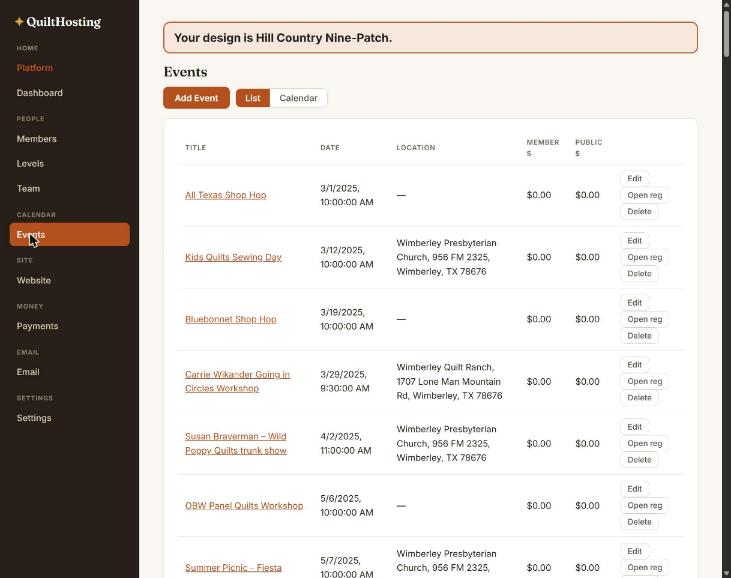
The Events list is every event the guild has ever had, oldest first. A guild that moved over from another system can have well over a hundred. Past events are harmless but make the list long.
- Use the Calendar view at the top of the Events screen to jump to this month.
- Delete removes an event and its registrations. No refunds are issued. Refund paid sign-ups from Payments first.
- Keep old events if you want an archive. There is no bulk delete, so they have to go one at a time.
If it goes wrong
| You see | Do this |
|---|---|
| The time is hours off | Time zone is not set. Settings → Time zone. |
| An event exists but is not on my Home page | /events always has it. To show it on Home, add an Events section to that page and publish. |
| I made a repeating event wrong | Delete the occurrences and create the series again. Repeats cannot be edited after creation. |
| I cannot make an event members-only | There is no such thing yet. Every event is public. |